Skip to content
An integrated operating suite for retail and hospitality

Smarter sales and order management

An integrated POS suite for sales, inventory and orders, combining ease of use with flexible operation on Windows and Android for stores, restaurants and cafés.

AndroidWindows 10/11Secure activation
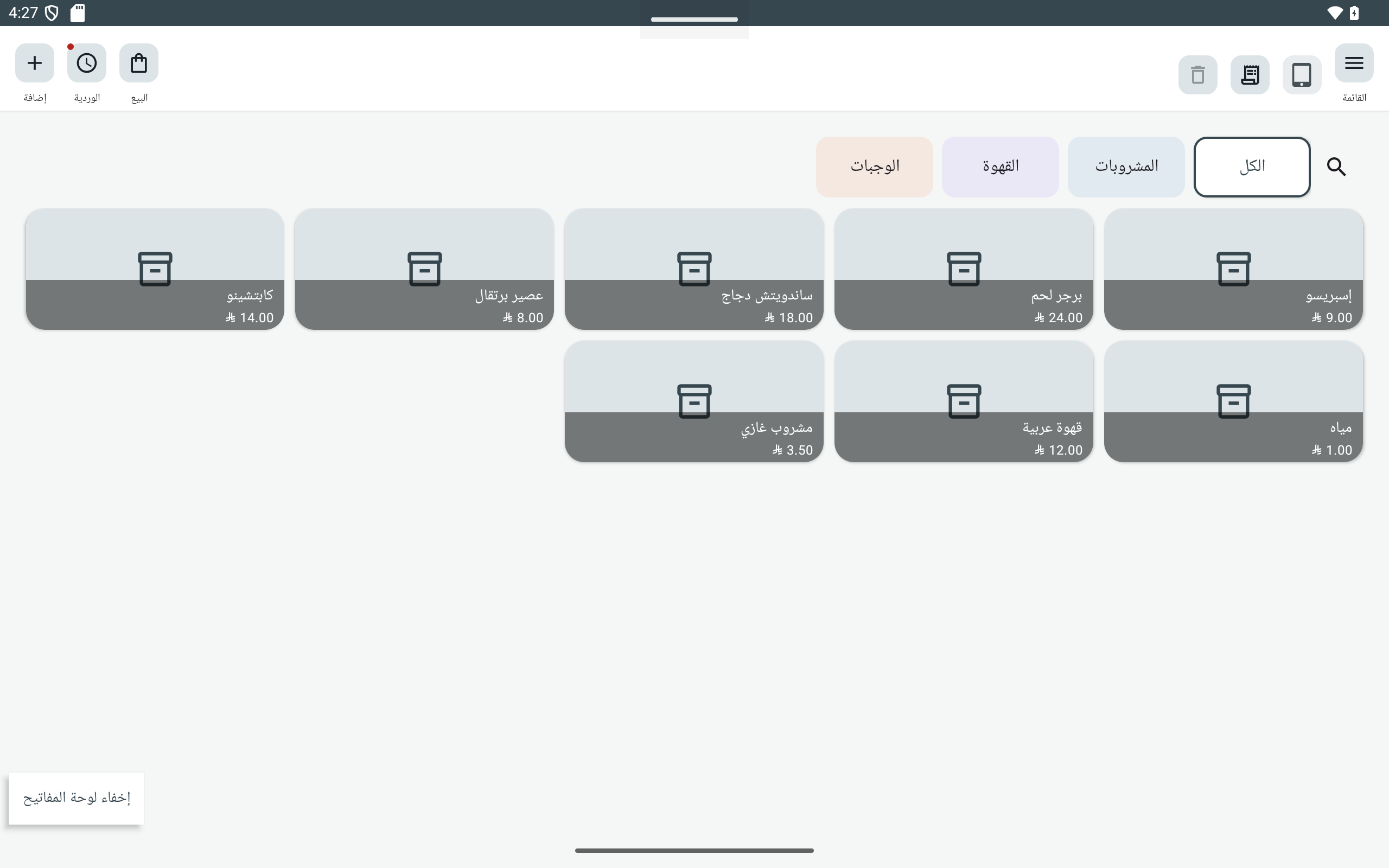
Explore Android app screenshots
Android checkout screen
Illustrative Android app screenshots; appearance varies by settings and version.
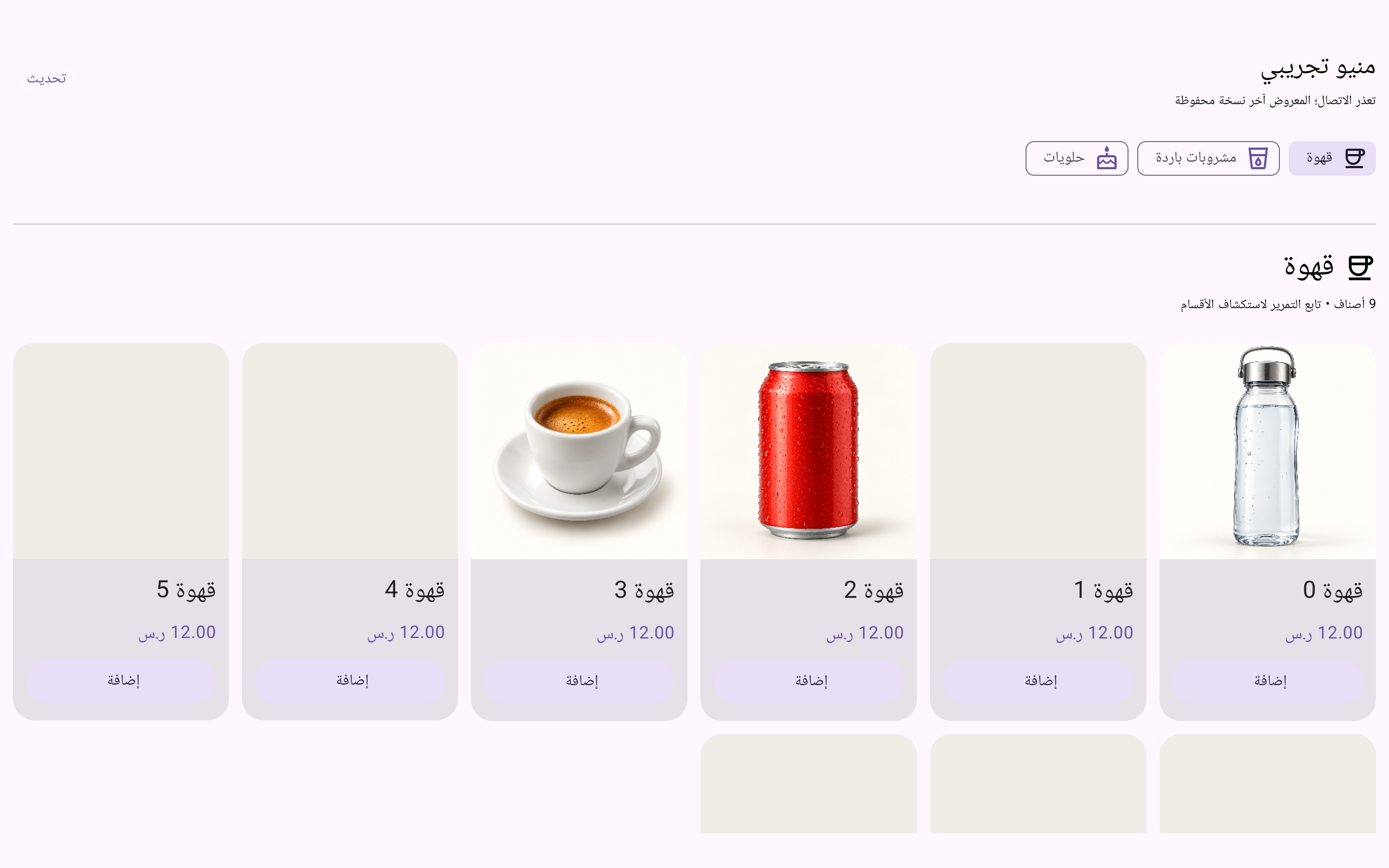
Digital menu connected to Android POS
Illustrative Android app screenshots; appearance varies by settings and version.
Android reports screen
Illustrative Android app screenshots; appearance varies by settings and version.
The suite

Solutions built around your business

Connected applications covering checkout, operations and the in-store ordering experience.

Android POS screen
SMCO POS

Point of sale

Sales, purchasing, inventory, invoices, returns, vouchers, shifts, reports and permissions.

  • Android and Windows
  • Multiple payment methods
  • Barcode and inventory
View features
Android menu screen
SMCO Menu

Digital menu

An optional Android POS add-on showing products, images and prices, with orders over the local network. Not available for Windows POS.

  • Arabic and English
  • Dine-in and takeaway
  • Product options and add-ons
View features
Illustrative mockup
SMCO Display

Order display

Tracks orders from preparation to ready and delivered on Android and Google TV.

  • Sound alerts
  • Clear preparation states
  • TV-friendly display
View features
Illustrative mockup
SMCO Management

Suite management

Private SMCO owner tools for licenses and activations, separate from the customer’s daily operations.

  • Signed activation
  • Subscription tracking
  • Verified updates
View features
From checkout to review

A clear path through each task

Find the screen, setup, permission and result in a platform-specific guide. Detailed instructions are in Arabic.

Backup and restore

Keep a backup and check the restore destination; licensing and fiscal linking are separate.

Practical capabilities

Everything you need to run efficiently

Verified capabilities from the current releases, with clear limits where a feature depends on setup or device type.

Sales and inventory

  • Fast checkout with search and barcode
  • Sales, purchases and returns
  • Products, categories, options and add-ons
  • Stock monitoring and optional sale prevention
  • Discounts, mixed payments and credit sales

Accounts and reports

  • Receipt, payment and expense vouchers
  • Transfers between accounts
  • Shifts and daily closing
  • Sales, return and tax reports
  • Excel report export on Android

Android menu and orders

  • Digital menu with images and prices
  • Local-network cashier connection
  • Optional dine-in, takeaway, tables and rooms
  • Preparation, ready and delivered states
  • Standalone TV display app

Management and protection

  • Users, roles and permissions
  • Signed offline device activation
  • Protected backup and restore
  • Signature and hash verified updates
  • Local sales without internet
01

Flexible cashier and kitchen printing

On Android, multiple printers can be configured and product categories routed to the kitchen, with independent language and layout per printer.

Network, Bluetooth and USB by device58 mm and 80 mm thermal paperArabic or English per printerClassic, table and modern layoutsFont, alignment and field controlsPermission-based reprintingConnection, cutter and cash drawer tests

Printer compatibility depends on model and connection; software tests do not replace testing the physical device.

SMCO POS──────────2 × Product1 × Add-on──────────TOTAL 68.00
Cashierالعربية · 80mm
KitchenEnglish · 58mm
Bilingual workflow

Arabic and English—from screen to printer

The suite supports Arabic and English interfaces with RTL and LTR layouts. Product names can be stored in both languages, and each printer can use its own print language.

العربيةإجمالي المبيعات12,480.00 ر.س
EnglishSales totalSAR 12,480.00

Ready to grow with SMCO?

Discover the right solution for your business and talk to our team about the SMCO suite.
Request a demoContact us

Become an SMCO partner

Join our distributor network and bring practical POS solutions to stores, restaurants and cafés across Saudi Arabia.

Apply as a distributor